
Z555 Game Deposit & Withdraw features are used to add funds to an account and request money from the available wallet balance. The exact payment options, minimum amounts, verification requirements, and transaction times can change, so always follow the options and instructions displayed inside your current Z555 account.
How the Z555 Game Wallet Works?
The wallet is the section of your account used for managing available funds.
Depending on the current version, you may find separate options for:
- Deposit
- Withdraw
- Transaction history
- Available balance
- Promotional or bonus balance
- Payment account details
Before making a transaction, check which balance you are using. Promotional credits may have different conditions from funds that are available for withdrawal.
How to Deposit Money in Z555 Game?
To add funds, start from the wallet or deposit section rather than sending money to a payment account provided through an unofficial message.
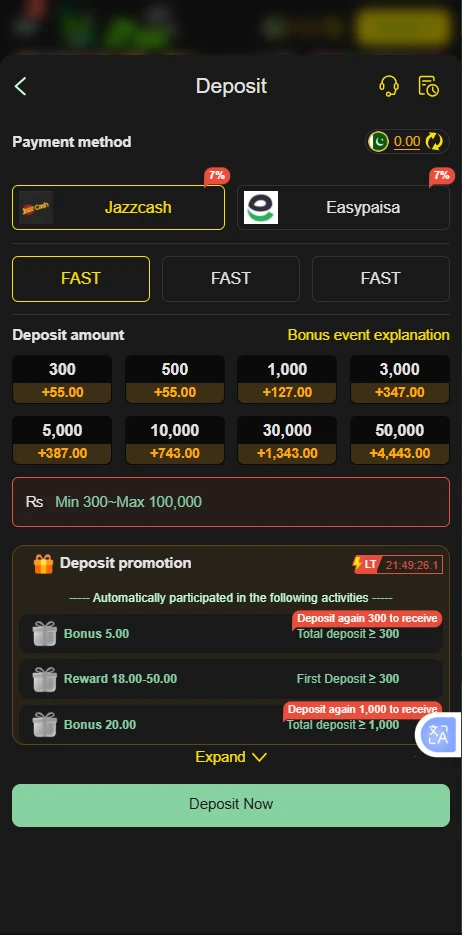
Z555 Deposit Steps
- Log in to your Z555 account.
- Open Wallet, Deposit, or the equivalent payment section.
- Review the payment methods currently available to your account.
- Select your preferred option.
- Enter the amount you want to deposit.
- Read the payment instructions shown on the screen.
- Complete the payment using the details provided by the platform.
- Keep the transaction reference or confirmation.
- Return to the wallet and check whether the balance has been updated.
Do not assume that a payment method shown on an old website or screenshot is still available. Use the options displayed in your current account.
Z555 Payment Methods in Pakistan
Payment availability can vary according to the current platform and account. Pakistani users may see local digital wallet options such as JazzCash or EasyPaisa, where supported.
If a payment method is not displayed in your account, do not send money to an unrelated number simply because someone claims that it can be used for Z555 deposits.
Always verify:
- Recipient details
- Payment amount
- Transaction reference
- Account information
- Current deposit instructions
The payment page inside your account should take priority over outdated promotional pages.
How to Deposit with JazzCash?
If JazzCash is displayed as an available Z555 payment option, select it from the deposit section and follow the instructions shown for your account.
A typical process is:
- Open the Z555 wallet.
- Select Deposit.
- Choose JazzCash, if available.
- Enter the deposit amount.
- Check the displayed payment details.
- Complete the JazzCash transaction.
- Save the payment confirmation.
- Check your Z555 wallet for the updated balance.
Do not transfer money to a JazzCash number obtained from an unofficial social media account or private message.
How to Deposit with EasyPaisa?
If EasyPaisa appears among the available payment options, select it from the current deposit page.
Follow the payment instructions shown on screen, confirm the recipient details before sending funds, and retain your transaction confirmation until the Z555 balance has been updated.
If EasyPaisa is not currently listed in your account, use another available method rather than sending money to an unverified account.
What to Do if a Z555 Deposit Is Not Showing?
A completed payment and an updated gaming balance are not always instantaneous.
If your deposit does not appear:
- Check whether the payment was actually completed.
- Confirm the amount and recipient details.
- Keep your transaction reference.
- Check the Z555 transaction history.
- Wait for the transaction status to update.
- Use the platform’s legitimate support channel if the balance remains unchanged.
Do not make the same deposit repeatedly simply because the first transaction has not appeared.
How to Withdraw Money from Z555 Game?
A withdrawal is normally started from the wallet’s Withdraw or Cash Out section.
Z555 Withdrawal Steps
- Log in to your account.
- Open the wallet.
- Select Withdraw.
- Review the available withdrawal methods.
- Choose an eligible payment option.
- Enter the required payment details.
- Enter the amount you want to withdraw.
- Check the information carefully.
- Submit the withdrawal request.
- Save the transaction details and monitor its status.
Your account may need to meet certain conditions before a withdrawal can be submitted. These can include account verification, minimum withdrawal requirements, or conditions attached to promotional funds.
Z555 Withdrawal Methods
The withdrawal options shown inside the account are the most important source of current information.
Depending on availability, Pakistani users may encounter local payment services such as JazzCash or EasyPaisa. Other methods may also be displayed.
Before submitting a withdrawal, check whether:
- The payment account belongs to you.
- The account information is correct.
- The selected method accepts the requested amount.
- Your account has completed any required verification.
- Any applicable withdrawal conditions have been met.
Z555 Withdrawal Pending
A pending withdrawal means the request has been submitted but has not yet reached its final status.
If your withdrawal remains pending:
- Check the transaction history.
- Confirm that the requested amount is correct.
- Check whether additional account verification is required.
- Do not submit repeated withdrawal requests unnecessarily.
- Keep the transaction reference.
- Contact legitimate support if the status does not change within the timeframe shown by the platform.
Avoid anyone who asks you to send an additional payment to a private account simply to “unlock” a withdrawal unless the requirement is clearly documented in the platform’s legitimate terms.
Z555 Withdrawal Failed
A failed withdrawal can happen for several reasons, including incorrect payment information, account restrictions, verification issues, unavailable payment methods, or other platform-side problems.
First check the withdrawal details and account status.
If the information is correct, review the transaction message provided by the platform before submitting another request.
Z555 Minimum Deposit and Withdrawal
There is no reason to publish a permanent minimum amount unless the current Z555 payment page clearly confirms it.
Minimum deposit and withdrawal requirements can change according to the payment method, account type, promotion, or platform version.
For that reason, check the amount displayed when you open the current Deposit or Withdraw section instead of relying on an old article or screenshot.
Z555 Withdrawal Fees
Payment fees can depend on the selected method and the current platform rules.
Before confirming a withdrawal, look for any displayed service charge or transaction fee. If a fee is shown, make sure you understand whether it is deducted from the requested amount or charged separately.
Do not assume that every payment method has the same fee structure.
Z555 Deposit vs Withdrawal
| Feature | Deposit | Withdrawal |
| Purpose | Adds funds to the account | Requests funds from the account |
| Starting point | Wallet → Deposit | Wallet → Withdraw |
| Payment details | Recipient/payment instructions | Your eligible receiving account |
| Verification | May be required | May be required |
| Transaction record | Should be retained | Should be retained |
| Availability | Depends on current payment options | Depends on current withdrawal options |
How to Check Z555 Transaction History
Transaction history can help you determine what happened to a deposit or withdrawal.
Open your account wallet and look for Transaction History, Records, or a similar option.
Depending on the platform, transactions may show information such as:
- Transaction type
- Amount
- Date
- Payment method
- Reference number
- Status
Use the transaction record when contacting support about a missing or delayed payment.
Payment Safety Tips for Z555 Users
Money transactions deserve more care than ordinary account activity.
Check the Payment Details
Before confirming a transfer, compare the payment information displayed by the platform with what you entered in your wallet or payment application.
Never Share an OTP
An OTP should remain private. Do not give it to someone claiming they need it to process your withdrawal.
Do Not Trust Unofficial Payment Accounts
Someone contacting you through a social platform may claim to be a Z555 representative. Do not automatically trust a payment number sent through private chat.
Keep Transaction Receipts
Save screenshots or references for completed deposits and withdrawals until the transaction has been fully resolved.
Do Not Chase a Failed Deposit
If your first transaction is still processing, submitting another payment can create additional confusion. Check the original transaction first.
Common Z555 Deposit & Withdrawal Problems
Deposit Completed but Balance Is Unchanged
Keep the payment receipt and transaction reference. Check the wallet history before contacting support.
Withdrawal Request Is Rejected
Review your payment details, account verification status, withdrawal conditions, and the reason displayed for the rejection.
Payment Method Is Missing
Payment methods can change. Use another method displayed in your current account rather than relying on an old list.
Wrong Payment Details Were Entered
Contact the legitimate support channel as soon as possible and provide the transaction reference. Do not send another payment until the situation is clear.
The App Shows a Different Balance
Check whether the difference is related to promotional credits, pending transactions, or another balance category shown by the wallet.
Can Bonus Money Be Withdrawn?
Not necessarily.
Promotional funds can have conditions attached to them. A bonus may require qualifying activity before some or all of the associated amount becomes eligible for withdrawal.
Always read the terms attached to a promotion before depositing money because the rules can differ between offers.
What Should You Check Before Your First Deposit?
Before adding money to an account, make sure you understand:
- The current deposit methods
- Minimum deposit requirement
- Any applicable transaction fees
- Bonus conditions
- Withdrawal requirements
- Verification requirements
- Account restrictions
- Available support options
If any of these details are unclear, find the relevant information before transferring money.
FAQs
How do I deposit money into Z555 Game?
Log in, open the wallet or Deposit section, choose a payment method currently available to your account, enter the amount, and follow the displayed payment instructions.
How do I withdraw money from Z555 Game?
Open the wallet, select Withdraw, choose an available payment method, enter your receiving details and amount, review the request, and submit it.
Does Z555 support JazzCash?
JazzCash may be available as a payment option for Pakistani users. Check your current Z555 deposit or withdrawal screen because payment availability can change.
Does Z555 support EasyPaisa?
EasyPaisa may be available where supported by the current platform. Always use the payment methods displayed inside your account.
Why has my Z555 withdrawal not arrived?
Check the transaction status, payment details, verification requirements, and any processing information provided by the platform. Keep the transaction reference until the issue is resolved.
What should I do if my Z555 deposit is missing?
Confirm that the payment was completed, check your transaction history, retain the payment receipt, and contact legitimate support if the balance remains unchanged.
Is there a fixed Z555 withdrawal limit?
Withdrawal limits can vary according to the current platform, payment method, account conditions, or applicable promotion. Check the amount shown in your current withdrawal section.
Are Z555 deposits refundable?
Do not assume that a completed deposit is automatically refundable. Review the current platform’s transaction and account terms before making a payment.
Does Z555 charge withdrawal fees?
Fees depend on the current payment method and platform conditions. Check the withdrawal screen for any applicable charge before confirming the transaction.
Responsible Use of Real-Money Gaming
Depositing and withdrawing money makes it especially important to keep gaming within a personal budget.
Never deposit money needed for rent, food, bills, education, or other essential expenses. Set a spending limit before playing and do not increase it simply because you have experienced losses.
Winning is never guaranteed, and a gaming balance should not be treated as regular income.
Final Thoughts
The safest way to handle a Z555 Game Deposit & Withdraw transaction is to use the payment options shown inside your current account, verify every payment detail before confirming a transfer, and keep your transaction records.
Payment methods, limits, fees, verification requirements, and processing procedures can change. Therefore, avoid relying on fixed figures copied from old Z555 guides. Check the current wallet instructions before every important transaction and never share your password or OTP with another person.
Z555 Game Deposit & Withdraw Guide in Pakistan 2026

Z555 Game Deposit & Withdraw guide for Pakistan. Learn how to add funds, request withdrawals, use available payment methods, check transactions and avoid common issues.
Price: Free
Price Currency: PKR
Operating System: Android 5.0+
Application Category: Casino Game
4.9